
Onboard suppliers without the spreadsheet relay.
Send one secure link. The supplier completes their own details, including bank account, GST or ABN, and trading entity. The approved record writes back to your ERP with a full audit trail.
Supplier onboarding still happens by email.
New suppliers arrive as a PDF, three follow-up messages, and a bank account in the body of an email. Vendor bank-account fraud cost Australian businesses AUD 84 million last year. The control that catches it is not in your inbox.
GST and ABN numbers go missing
Tax IDs arrive in the email body, the attachment, or a follow-up message. Someone copies them into a spreadsheet. Someone else keys them into the ERP. The audit version is the version that got typed last.
Bank details verified by inbox
A new vendor sends a bank account on letterhead. A change request arrives a week later from a slightly different address. The control between those two emails and your supplier ledger is one finance clerk.
Duplicate suppliers stack up
The same supplier gets created three times under three legal-entity spellings. Spend reporting fragments. Payment terms diverge. The fix is a quarterly clean-up that nobody owns.
No audit trail for the request
When the auditor asks who approved the new supplier, the answer lives across three inboxes, a Teams chat, and a screenshot. Email is not an audit trail. It never was.
One workflow, four steps, no rekeying.
From the moment a procurement request lands to the point the supplier exists in your system of record. The same flow works for a new supplier, a bank-account change, or a payment-terms update.
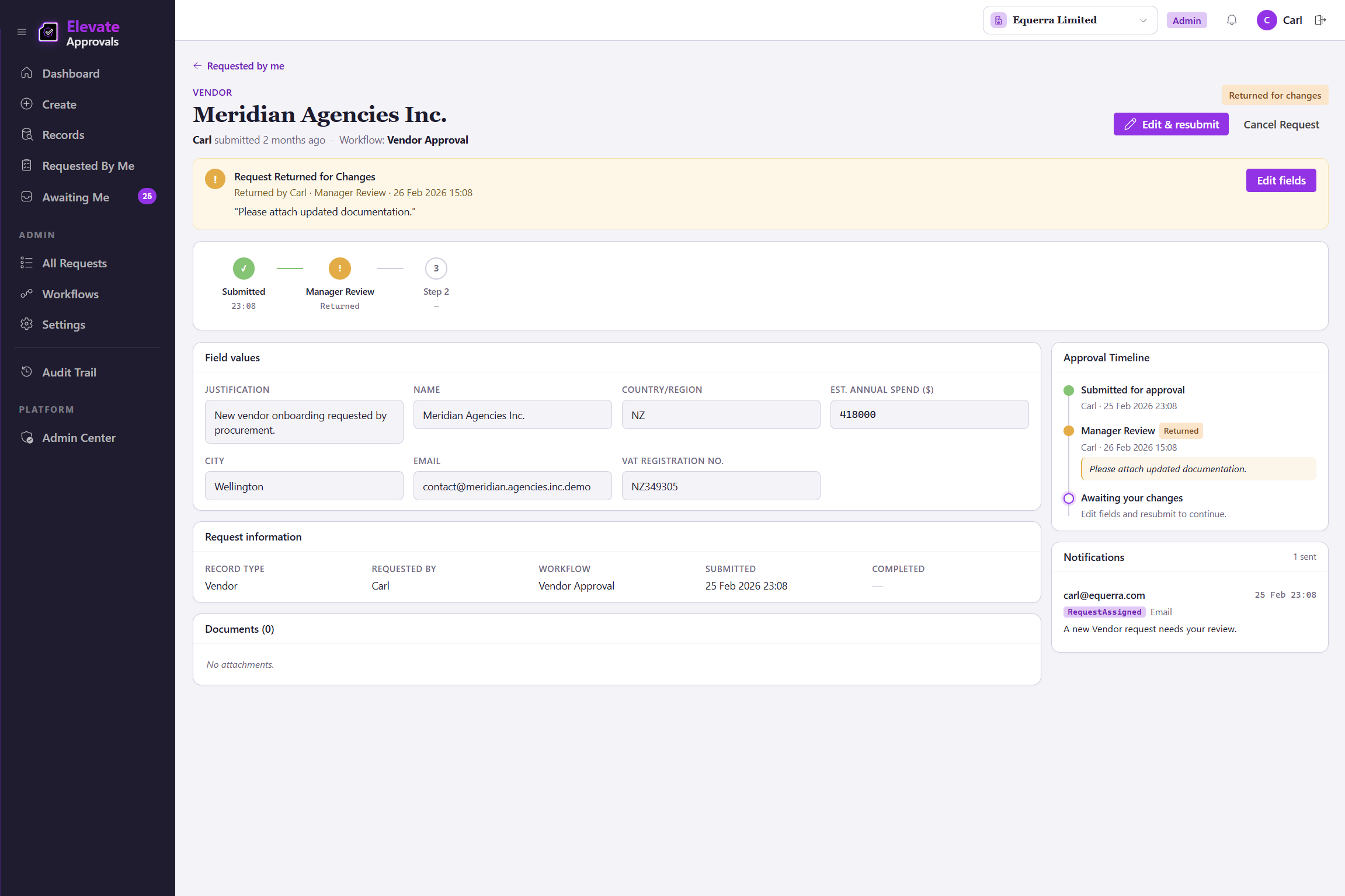
Two pairs of eyes on every bank-detail change.
The most common attack path on a finance team is a vendor-impersonation email asking to update a bank account. The four-eyes principle puts a second pair of eyes on the change, before it reaches your supplier ledger. The AU Privacy Act 2024 carries penalties up to AUD 50 million for serious breaches; the audit trail behind a four-eyes gate is what you hand the regulator.
Four-eyes on the bank-account change workflow
The workflow that updates a vendor bank account runs with four-eyes enforced. When the requestor is also configured as an approver, the engine excludes them and routes to a second authorised approver. No self-approval, no exceptions.
Original and proposed values, side by side
The second approver sees what was there and what is being asked for. Anomalies surface. Out-of-band callbacks are still your decision; the workflow records that you made one.
Time-stamped, attributed, immutable
Every approval logs the approver, the timestamp, the IP, and the reason. The record reaches your ERP only after the second signature lands.
Your ERP, your HRIS, or your CRM. Your call.
Elevate Approvals sits beside your system of record, not inside it. The approved supplier writes back to whichever system you use, through a native connector or a documented API.
Microsoft Dynamics 365 Business Central
Native, bidirectional connector. The approved supplier is created or updated in Business Central by a job queue, no manual rekeying. Lookup data (payment terms, currencies, posting groups) is sourced from Business Central so the form options match the ERP.
Any ERP, HRIS, or CRM via REST and webhooks
SAP, NetSuite, Sage Intacct, Workday, an in-house system; the approved record posts through documented endpoints. Webhook events fire on submission, approval, and final write-back.
Bring your own orchestration
Microsoft Power Automate, Make.com, or an internal integration layer can subscribe to Elevate Approvals webhooks. The approval logic stays in Elevate Approvals. The plumbing stays where you already run it.
Supplier onboarding, answered.
The questions buyers ask before they sign up. If yours is not here, contact us and we will answer it directly.
Does the supplier need an Elevate Approvals login?
No. The supplier opens a single-use secure link, completes the form, and submits. They do not see your tenant, your other suppliers, or any login screen.
Can the form capture an ABN, GST number, or NZ IRD number?
Yes. Tax IDs are configurable fields with format validation. Required, optional, or conditional on jurisdiction. The approved value is what writes to your ERP.
How does duplicate detection work?
Every submission runs against your existing vendor master in four modes: exact match (block, the form refuses to save and tells the requestor what it matched), exact match with a Proceed Anyway warning (the duplicate, the override, and the reason are captured in the audit trail), normalised name (strips punctuation, casing, and trading-name suffixes to catch near-duplicates like "Equerra Pty Ltd" against "Equerra (PTY) LTD"), and substring (catches partial matches inside a longer value). Internal reviewers see flagged matches in the workflow and can merge or reject without sending a second email.
What happens if the supplier sends a bank-account change later?
A change request runs through the same workflow as a new vendor, with four-eyes enforced at the workflow level (the requestor cannot also be the approver). The original and proposed values are visible to the second authorised approver. See our guide on vendor bank-account fraud for the broader pattern.
Do approved records reach Microsoft Dynamics 365 Business Central automatically?
Yes. The native Business Central connector polls a job queue and creates or updates the vendor record. If the write-back fails, the request returns for editing and every retry is logged.
What if we use a different ERP?
Elevate Approvals is a master data approval platform; Business Central is one valuable destination. REST APIs and webhooks let you write the approved record into any ERP, HRIS, or CRM. The same supplier-onboarding flow applies.
How long does a workflow take to configure?
A finance admin builds a working supplier-onboarding workflow in an afternoon using pre-built templates. Single-approver and four-eyes workflows ship on every plan. Group, quorum, conditional, and field-routed routes are part of the Advanced Workflows add-on if your onboarding needs them.