
One platform for every approval that creates or changes a master data record.
A configurable workflow engine, a drag-and-drop form builder, and counterparty-facing forms in one platform. Routes the request, captures the data, applies four-eyes where you nominate it.
The routes your team needs. One audit trail.
Every approval scenario your finance, operations, and HR teams already run, modelled in one engine. Single-approver and four-eyes workflows ship on every plan; group, quorum, conditional, and field-routed routes are part of the Advanced Workflows add-on.
- Single
One named approver reviews and decides.
- Group (first to approve)
Any member of a named group can clear the step. First decision wins.
- Group (all must approve)
Every member of a named group has to approve before the step clears.
- Quorum (X of N)
A configurable number of approvers from a group must approve. Two of three, three of five, you set the threshold.
- Conditional
And/or parameter logic that branches the workflow into one or many downstream steps based on field values, value bands, or earlier decisions.
- Field-routed
Send the request to a different approver depending on the value of a field on the record: department, region, entity, currency, anything you nominate.
- Four-eyes
A workflow-level rule: when the requestor is also configured as an approver, the engine forces a second authorised approver. Optional on any workflow you nominate. Included on every plan.
- Sequential ordering
Steps run in the order you define. A property of any workflow, not a separate route.
- Per-step SLA
Set a target time for any step. The engine tracks every request against it.
- Automated escalation
When a step misses its SLA, the engine fires the configured escalation: notify a manager, reroute to a delegate, or surface the breach in the dashboard.
Routes 2 to 4 and both conditional aspects require the Advanced Workflows add-on.
Build any record type. Without a developer.
Drag-and-drop the fields, set the rules, mark the form counterparty-facing if you need to. Suppliers, customers, staff, GL codes, projects, and any custom record you onboard.
-
Drag-and-drop fields
Build any record type from text, numerics, dates, lookups, file uploads, and signature blocks. No code, no consultants.
-
Conditional show and required
Show fields, hide them, or mark them required based on what the requestor or counterparty just answered. The form adapts as the request gets filled in.
-
Counterparty-facing flag
Mark a form as counterparty-facing and it renders on a secure scoped surface. Suppliers, customers, and new starters are common examples; the same surface works for any workflow you nominate.
-
Validation at submission
Required fields, field-format checks, and the duplicate-detection modes below all run before the record enters the workflow.
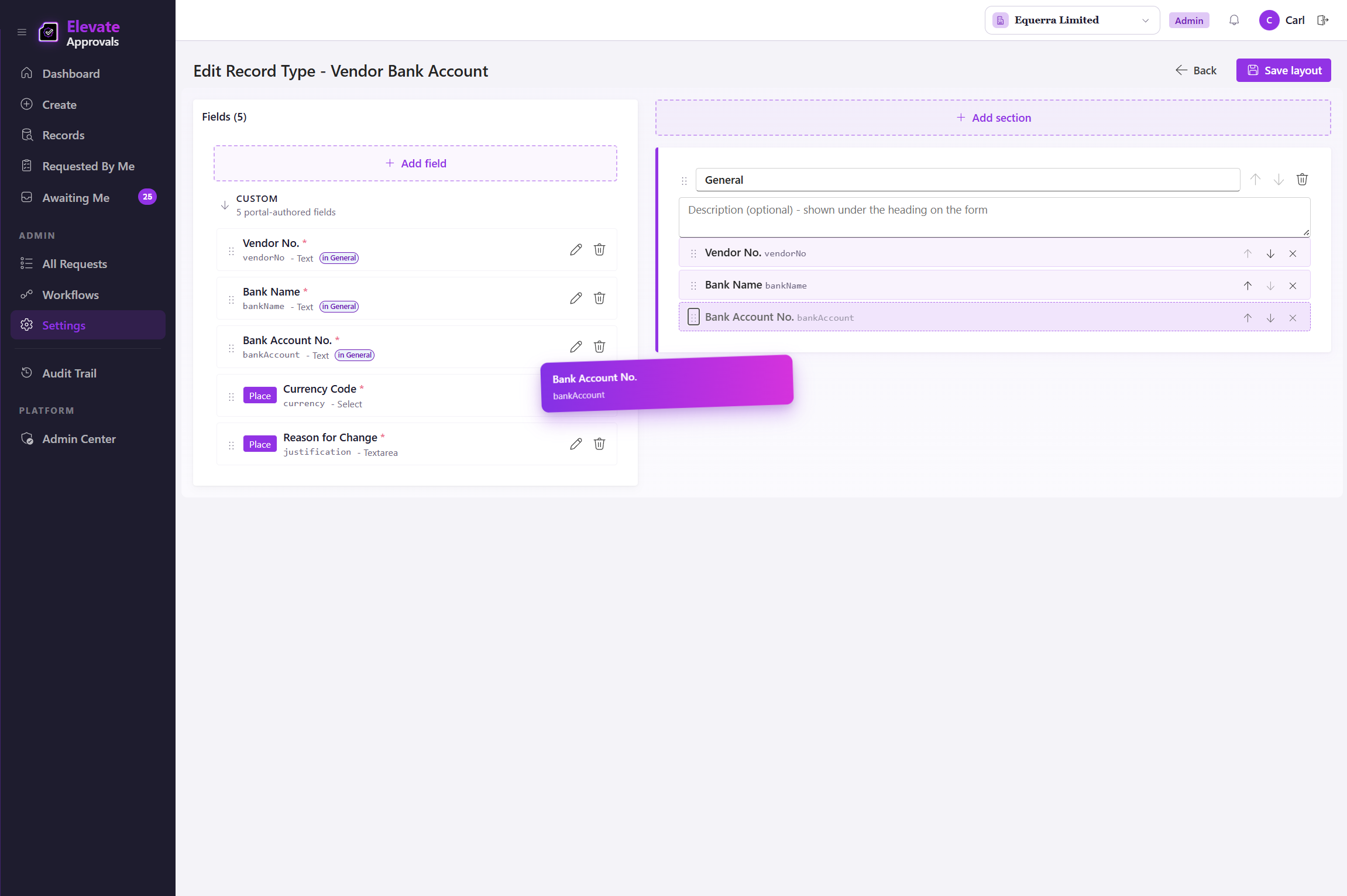
Four modes. Caught before the workflow runs.
The form builder runs every submission against the record set you point it at. Pick the mode that fits the field. The block-and-warn modes are common on supplier names and bank accounts; the normalised and substring modes catch the near-duplicates that exact matching would miss.
Exact match, block
The same value already exists in the record set. The form refuses to save and tells the requestor which record it matched.
Exact match, warn
The same value exists, but the requestor can Proceed Anyway. The duplicate, the override, and the reason are captured in the audit trail.
Normalised name
Strips punctuation, casing, and trading-name suffixes before comparing. Catches "Equerra Pty Ltd" against "Equerra (PTY) LTD".
Substring
Catches partial matches inside a longer value. "Equerra Ltd" is flagged inside "Equerra Limited Australia".
Bring the supplier into the workflow. Not the inbox.
Send one secure link. The counterparty completes their own details on a scoped surface that never touches your tenant. The submission lands directly in the approval workflow. Available on any workflow you nominate; see it applied to supplier onboarding as one example.
One secure link, no login
Send a single tokenised link. The recipient completes the form in their own browser, on a scoped surface that never touches your tenant.
Available on any workflow
Mark any workflow counterparty-facing and the same surface applies. Supplier onboarding, customer credit applications, and pre-hire data capture are common examples; the same model works for grant applicants, contractors, beneficial owners, or any party outside your tenant.
Attachments and signatures accepted
Upload bank statements, certificates of incorporation, and signed declarations directly into the request. Audit trail preserved.
One user. Many companies. Scoped by approvals.
Operate across every entity in your group from one login. Each user sees the queues, records, and workflows scoped to the companies and approvals you grant them. A controller in entity A only sees their queue; a shared services team can act across all of them. The audit trail stays per-entity, ready for the right auditor on the right scope.
The requester is never the approver.
Four-eyes on the workflows you nominate. Vendor bank accounts, customer credit limits, payment terms, or any workflow where one signature is the wrong control. The requestor is excluded from approving their own request. Bypass detection catches the workarounds. Four-eyes ships on every plan; the add-on only opens additional step types.
Vendor bank-account gating
A change to a vendor bank account routes to a second authorised approver, with the previous and proposed values visible side by side. The change does not take effect until that approver signs.
Customer credit-limit gating
Credit-limit increases route through four-eyes when the requestor sits in the approval chain, with the credit file and previous limit attached to the decision.
No-self-approval, anywhere
Nominate any workflow you want to lock. When the requestor is also configured as an approver on that workflow, the engine excludes them and routes to a second authorised approver. The audit log carries both names.
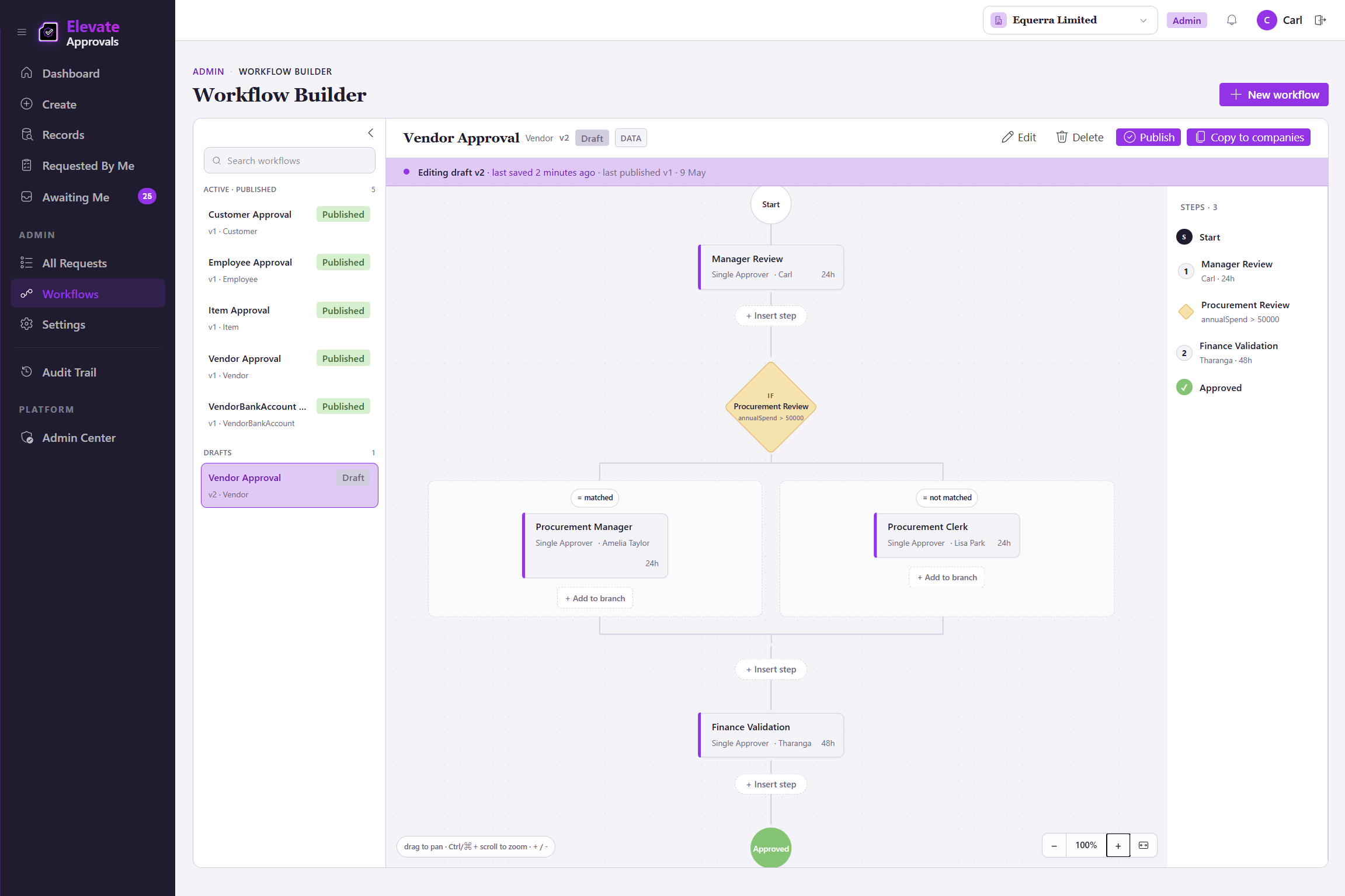
Catches ERP record changes that were supposed to be approved but were bypassed. For example, an ERP-side override that updates a vendor bank account directly, or a configuration change that lets a record save without running the workflow. Every detection is logged with who, what, when, the previous value, the new value, severity, and resolution status.
The right person, at the right time, every time.
Twelve event types across email, Microsoft Teams, and the in-portal feed. Out-of-office delegation that fires when the approver is away, with the audit trail intact.
Scheduled out-of-office
Set a date range; approvals route to your delegate automatically and revert when you return.
Ad-hoc handover
Hand a single in-flight request to a colleague without changing the rule for everything else.
Audit trail preserved
Every delegated approval records both the original approver and the delegate, with the reason and the date range.
Open by default. REST in. Webhooks out.
Connect Elevate Approvals to any ERP, HRIS, or CRM, including a native Microsoft Dynamics 365 Business Central integration. See the integrations hub for the full picture.
REST endpoints for every object
Read and write requests, approvals, forms, audit entries, and counterparty submissions over a documented REST API.
Webhook events
Subscribe to step approved, request finalised, bypass detected, counterparty form submitted, and the rest of the lifecycle.
Bring your own orchestration
Wire Elevate Approvals into Microsoft Power Automate, Make.com, or your in-house engine. The platform stays the system of approval.
Authentication via Microsoft Entra ID
Service-to-service tokens issued through Microsoft Entra ID. Same identity layer your administrators already manage.
See where approvals slow down. Then fix it.
SLA, bottleneck, and bypass dashboards covering every record type and every step. Filterable, exportable, ready for the audit pack.
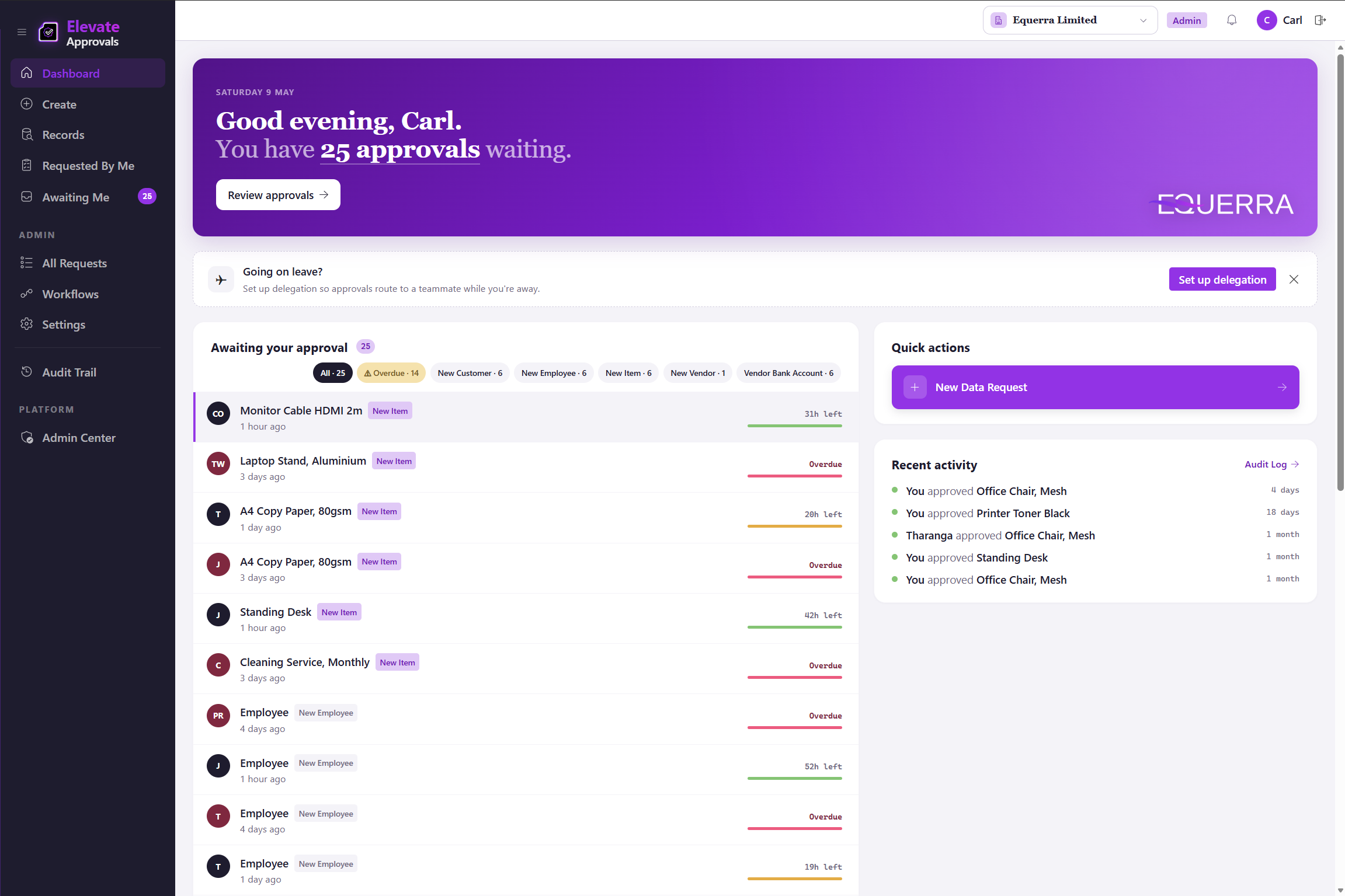
SLA dashboards
Percentage of requests completed within target, tracked over time and broken out by record type, group, and step.
Automated escalation
When a step misses its SLA the engine fires the configured escalation: notify a manager, reroute to a delegate, or flag the breach. Every escalation event is shown alongside the SLA picture.
Bottleneck analysis
Queue depth by step, average wait time per approver, delegation rates, and the steps that breach SLA most often.
Bypass dashboard
Every detected bypass in the last 30 days, classified by severity, with resolution status alongside.