
Approve a new customer with the credit file already in your hand.
The customer self-completes the credit application through a secure link. Internal credit checks run inside the workflow. Four-eyes signs off the credit limit. The approved record writes back to your ERP or CRM with a defensible audit trail.
Customer credit decisions still live in inboxes.
New customers arrive by email, with credit limits set on a Teams reply. The audit version is a screenshot. The board version is a memory. Email is not an audit trail. It never was.
Credit applications arrive by email
A PDF, three follow-ups, and a phone-call summary. Sales chases the customer. Finance chases sales. The application enters the ERP after someone has typed it twice.
Bank and trading details go missing
Direct-debit details, trading entity, ABN or NZBN; one of the three is wrong on the day you onboard. The fix is a phone call and a re-key, not a re-route.
Credit limits change in the comments of a spreadsheet
Sales asks for an increase. A controller approves it in a Teams reply. The new limit reaches the customer master file with no record of who approved what, or why.
No audit on credit decisions
When the auditor or the board asks how a customer ended up with a higher credit line, the answer lives across an inbox, a spreadsheet, and a memory. The trail is not defensible.
One workflow, five steps, from invite to ERP.
From the moment sales raises a new-customer request to the point the customer has a credit limit and a clean record. The same flow handles a credit-limit increase, a payment-terms change, or a trading-entity update.
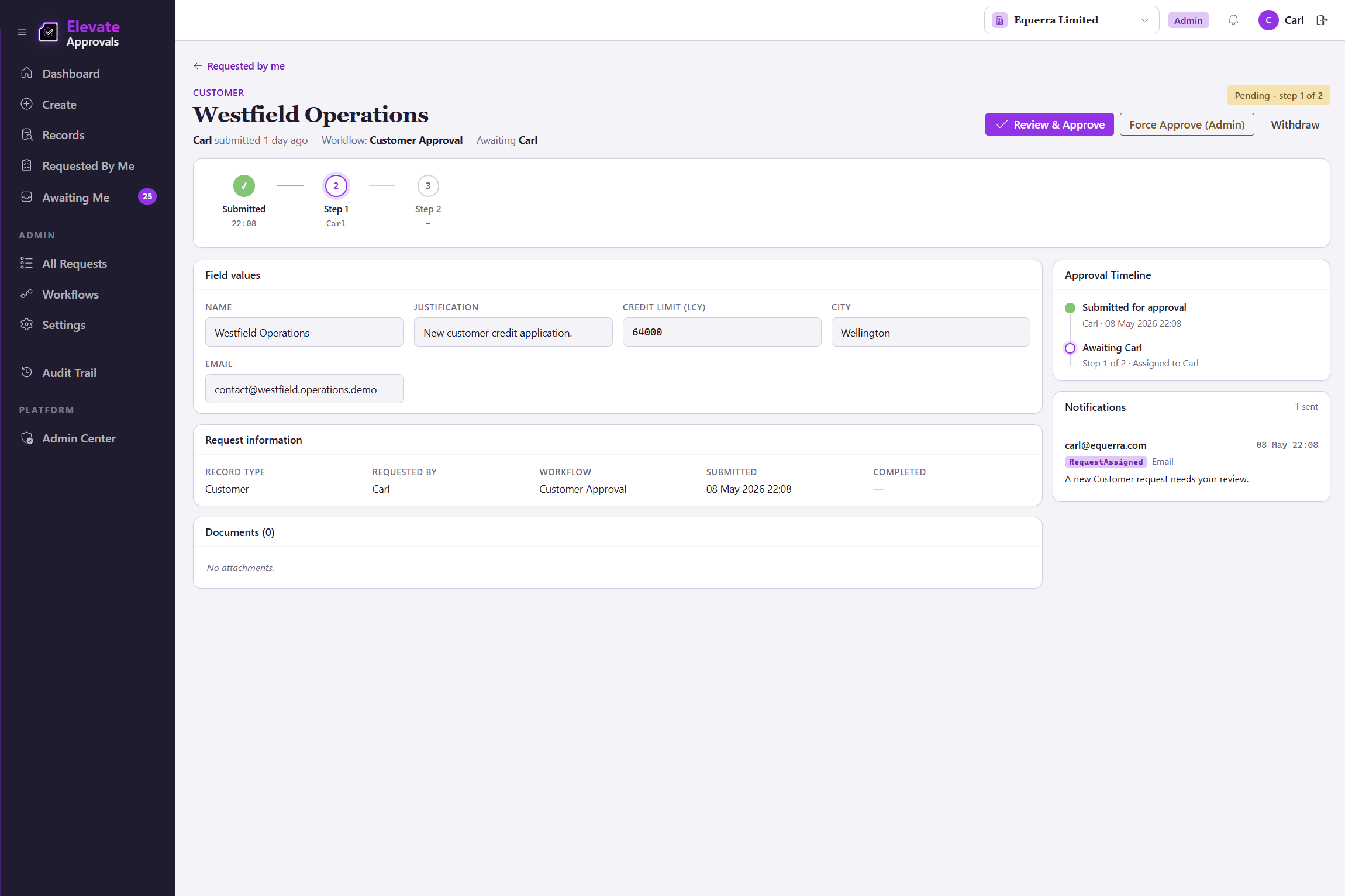
Two pairs of eyes on every credit limit.
The credit limit is one of the workflows that moves money. Four-eyes (the requester cannot approve their own request) puts a second pair of eyes on the value, the supporting documents, and the requesting context. The audit trail is what your auditor and your board are looking for when the question is, why this number?
Four-eyes on the credit-limit decision
A new credit limit, or a change to an existing one, cannot be approved by the person requesting it. An independent second approver signs off, with the proposed value, the credit report, and the requesting context all visible.
Conditional routing by limit band
A NZD 5,000 limit goes to a credit officer. A NZD 250,000 limit goes to a controller and the CFO. The threshold is configured once, not negotiated every time. Conditional routing is part of the Advanced Workflows add-on; four-eyes itself ships on every plan.
Time-stamped, attributed, immutable
Every approval logs the approver, the timestamp, the supporting documents, and the reason. The credit decision is defensible to the board and to the auditor.
Your ERP, your CRM, or both.
Elevate Approvals sits beside your customer master, not inside it. The approved customer writes back to whichever system holds the truth, through a native connector or a documented API.
Microsoft Dynamics 365 Business Central
Native, bidirectional connector. The approved customer is created or updated in Business Central by a job queue, with the credit limit and payment terms gated by the workflow you configured. Lookup data is sourced from the ERP so the form options match.
Any ERP or CRM via REST and webhooks
Salesforce, HubSpot, NetSuite, SAP, Sage Intacct, an in-house customer-master service; the approved record posts through documented endpoints. Webhook events fire on submission, approval, and write-back.
Bring your own orchestration
Microsoft Power Automate, Make.com, or an internal integration layer can subscribe to Elevate Approvals webhooks. The approval logic stays in Elevate Approvals; the routing to your downstream systems stays where you already run it.
Customer onboarding, answered.
The questions buyers ask before they sign up. If yours is not here, contact us and we will answer it directly.
Does the customer need an Elevate Approvals login?
No. The customer opens a single-use secure link, completes the credit application, and submits. They do not see your tenant or your other customers.
Can the form include trade references and a credit-bureau attachment?
Yes. Trade references, financial statements, and credit-bureau reports are configurable fields and attachment slots. Conditional logic shows or hides fields based on the requested limit or the trading entity.
Does the form catch duplicate customer records?
Yes. Every submission runs against your existing customer master in four modes: exact match (block, the form refuses to save and tells the requestor what it matched), exact match with a Proceed Anyway warning (the duplicate, the override, and the reason are captured in the audit trail), normalised name (catches near-duplicates that exact matching would miss, like "Equerra Pty Ltd" against "Equerra (PTY) LTD"), and substring (catches partial matches inside a longer value). Reviewers see flagged matches in the workflow and can merge or reject without sending a second email.
How is the credit limit gated?
The credit-limit workflow runs with four-eyes enforced at the workflow level. When the requestor is also configured as an approver, the engine excludes them and routes to a second authorised approver. Conditional routing by limit band sends a NZD 5,000 limit to a credit officer and a NZD 250,000 limit to a controller and the CFO. See our four-eyes solution page for the full pattern. Conditional and field-routed routing are part of the Advanced Workflows add-on.
What happens when a customer asks for a credit-limit increase later?
A change request runs through the same workflow. The proposed value, the current limit, and the supporting documents are visible to the second approver. The audit trail records who asked, who approved, and why.
Do approved records reach Microsoft Dynamics 365 Business Central automatically?
Yes. The native Business Central connector creates or updates the customer record on a job queue. If a write-back fails, the request returns for editing and every retry is logged.
What if our customer master lives in a CRM, not an ERP?
Elevate Approvals is a master data approval platform. Approved customers can write to a CRM, an ERP, or both, through REST APIs and webhooks. The same customer-onboarding flow applies.
How long does a workflow take to configure?
A finance admin builds a working customer-onboarding workflow in an afternoon using pre-built templates. Single-approver and four-eyes workflows ship on every plan. Group, quorum, conditional, and field-routed routes are part of the Advanced Workflows add-on if your onboarding needs them.